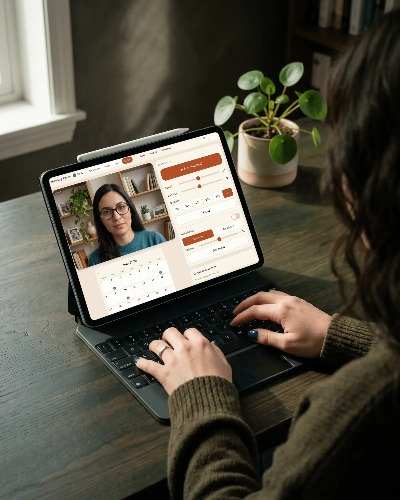
- Full client management system
- Intake forms, assessments and notes
- Calendar, booking diary and reminders
- Multiple therapy modality tools
- Automated invoice & payment tracking
- Encrypted backups and app lock
A complete stand alone solution for the independent therapist
Video call, notes, worksheets, session tools, scheduling and invoicing all in one workspace, made for independent therapists. No juggling tabs, switching apps, or wondering where a client's history lives.
Device agnostic — Mac, Windows, tablets, phones and more. Install the app, open, and begin.
Most practice software sells you more admin. Fallowing is built to protect your attention.
A private practice usually means sitting down to a session with half a dozen browser tabs open, three or four separate subscriptions, and the quiet drag of switching between them just to find where a client's history lives. Notes are in one place, worksheets in another, billing somewhere else again.
Fallowing brings your client records, therapy tools, diary and invoicing into one workspace.
Everything in one place
Switching between worksheets, web tools, PDFs and separate subscriptions breaks concentration and interrupts the flow of a session.
Fallowing brings ACT matrices, CBT thought records, DBT frameworks, genograms, bilateral stimulation, SUDS tracking and other clinical tools directly into the same workspace as your notes.
When a tool becomes part of the conversation, it’s already there.
Less software. More attention.
Most therapists end up piecing together a client’s history from notes, emails, worksheets and documents spread across different systems.
Fallowing keeps everything connected to a single client record. Session notes, treatment goals, uploaded documents, invoices, worksheets and progress tracking all live in one place, making it easier to understand where someone has been and where they’re heading.
One client. One record. Nothing scattered.
Whether you’re working remotely or face-to-face, the therapeutic hour should feel focused and uninterrupted.
Share worksheets, sketch ideas together, open client history, take notes, run clinical tools and stay connected to the session without bouncing between browser tabs and disconnected applications.
The software fades into the background so the conversation can stay at the centre.
Built to support presence, not compete for it.
Notes become most valuable when they’re connected to the work happening around them.
Capture observations, interventions, reflections and treatment plans while keeping worksheets, progress tracking and session history visible beside them. Everything remains linked to the same client record, creating a timeline that builds naturally over time.
A clearer picture of every client’s journey.
A private practice doesn’t stop when the session ends.
Manage appointments, track attendance, generate branded invoices, record deposits and monitor payments from the same workspace used during clinical work. No exporting data. No duplicate entry. No moving information between systems.
Administration becomes part of the workflow rather than another job waiting at the end of the day.
Less time managing your practice. More time running it.
Most software asks you to trust someone else’s servers with your clients’ information.
Fallowing takes a different approach. Your encrypted records stay on your own machine, under your control. You decide how they’re backed up, where they’re stored and when they’re exported.
No vendor lock-in. No dependence on a central database. No uncertainty about where your data lives.
Your clients’ records remain yours to steward.
One unbroken hour
One screen carries a single client from notes to worksheet to invoice — without opening another tab or app.
One click opens the folder (usually already pinned) — progress logs and active treatment tracking.
Launch a clinical framework — an ACT matrix or CBT log — right beside the history.
Type as you go, or right after, inline with the open worksheet and tied to this client only.
Choose the tools that fit you and your client — everything from bilateral stimulation to tracing a family genogram.
Generate a branded invoice tied to the session, logging the deposit, before closing the file.
Try the tools
These tools are just a small sample of what's in the therapy room. The full app has many more, plus a two-way sketchpad, document sharing and more. Nothing here is saved or uploaded; refresh and it resets.
Log distress and belief shifts without breaking focus. This is the same tracker that's in the app — tap a number and the curve updates. Inside Fallowing it saves into the client's session timeline automatically, alongside the target, interweaves and closure.
Tap a person to select, choose a relationship, then tap another. Tap a person on its own to rename.
Keep family maps tied to your notes. This sandbox lives in temporary memory. In the Fallowing app, structural charts link straight to the client’s record and update across years of care.
| Situation | Automatic thought | Emotion (0–100) | Evidence for | Evidence against | Balanced thought | Outcome |
|---|---|---|---|---|---|---|
Collaborative structure without tech noise. Fallowing never uploads what you type. In the app these worksheets run locally and auto-save straight to your machine as protected records.
Track psychological flexibility over time. The app archives each client’s matrices, so you can review value alignment across a multi-month clinical journey.
Fewer subscriptions
From bilateral stimulation to family genograms to thought records — the tools you'd otherwise pay for separately, in one place you own.
| The scattered subscriptions | The Fallowing alternative |
|---|---|
| Cloud practice management & diaries (~£30/mo) | Local records, scheduler & invoicing — included |
| Standalone bilateral / EMDR web tools (~£15/mo) | Bilateral stimulation with SUDS & VoC tracking — included |
| Specialised genogram drawing apps | Native vector family-system builder — included |
| External form providers & document holders | CBT, DBT, ACT & person-centred workspaces — included |
In their words
“[ Placeholder — a real therapist’s quote goes here. A sentence or two on how Fallowing changed the day-to-day of their practice. ]”
Privacy & compliance
No clinical records are stored on our servers — none. Your notes, client histories, and schedules live only on your device, encrypted and fully under your control.
Because you keep full custody of your data, Fallowing helps you meet your obligations under UK and EU GDPR — and the same on-device architecture supports US practitioners’ HIPAA obligations. If you receive a Subject Access Request, or simply want to move on, you can export a client’s complete record in one click, as a clean, readable file.
Redundancy shouldn’t mean compromising your ethics. Fallowing makes it a one-tap job to export an encrypted-at-rest backup to your own external drive or private cloud. Your data stays yours, but it stays protected from physical accidents.
Fallowing saves your records in transparent, non-proprietary formats on your machine. No gatekeeping, no silos. Even if you stop using Fallowing tomorrow, your archive stays readable, portable and accessible to you.
Fallowing began with a simple belief: therapists deserve software that supports presence rather than competing for attention. We built the tools we wished existed — quiet, integrated, private, and designed to remain entirely under the clinician’s control.
Often replacing £50–£100/month of separate software subscriptions. You always know where your data lives, how it’s backed up, and exactly how to export it.
Updates happen in a single click, preserving your configurations and data completely. No forced cloud migrations, no sudden layout overhauls, no disruptions to your session rhythm.
On the device where you use the app, in its secure local storage. It isn’t uploaded to us or any shared server — which is why a one-tap backup matters, and why we make exporting one effortless.
The practice tools — notes, worksheets, diary, invoicing, records — work offline. Remote video needs an internet connection, but it's encrypted and built in: there's no separate video account to set up. Activating a licence needs a brief connection.
It's built for integrative practice. There are structured workspaces for EMDR (bilateral stimulation with SUDS & VoC tracking), CBT (thought records), ACT (the matrix and values work), DBT (diary card, skills and chain analysis), and person-centred work, plus a family-systems genogram builder and a shared sketch pad. Records, scheduling, notes and invoicing work the same whatever modality you use — and you only switch on the tools you want.
Export a backup from the old device and restore it on the new one — everything comes across, and your licence re-activates.